> For the complete documentation index, see [llms.txt](https://codemash.gitbook.io/codemash/llms.txt). Markdown versions of documentation pages are available by appending `.md` to page URLs; this page is available as [Markdown](https://codemash.gitbook.io/codemash/cloud/sms.md).
# SMS
Send text messages to your users' phones — one-time codes, alerts and bulk campaigns — from templates, through your SMS provider.
The SMS module sends text messages to your users' phones: one-time codes, delivery alerts, reminders and bulk campaigns. You write the text once as a **template** (one version per language, with `@Model.…` tokens), connect a **provider** that delivers it (an **integration**), and send it from a **campaign** or from a trigger. SMS uses the same template engine, token binding and campaign rules as Email and Push.
## Enable the module
Open a project and choose **Sms** in the left menu. While the module is off, Cloud shows this page; scroll down and press **ENABLE**. You need a project role that can manage modules (the `sms:manage` permission, for example **Owner** or **Administrator**).
SMS → enable page, shown while the module is off.
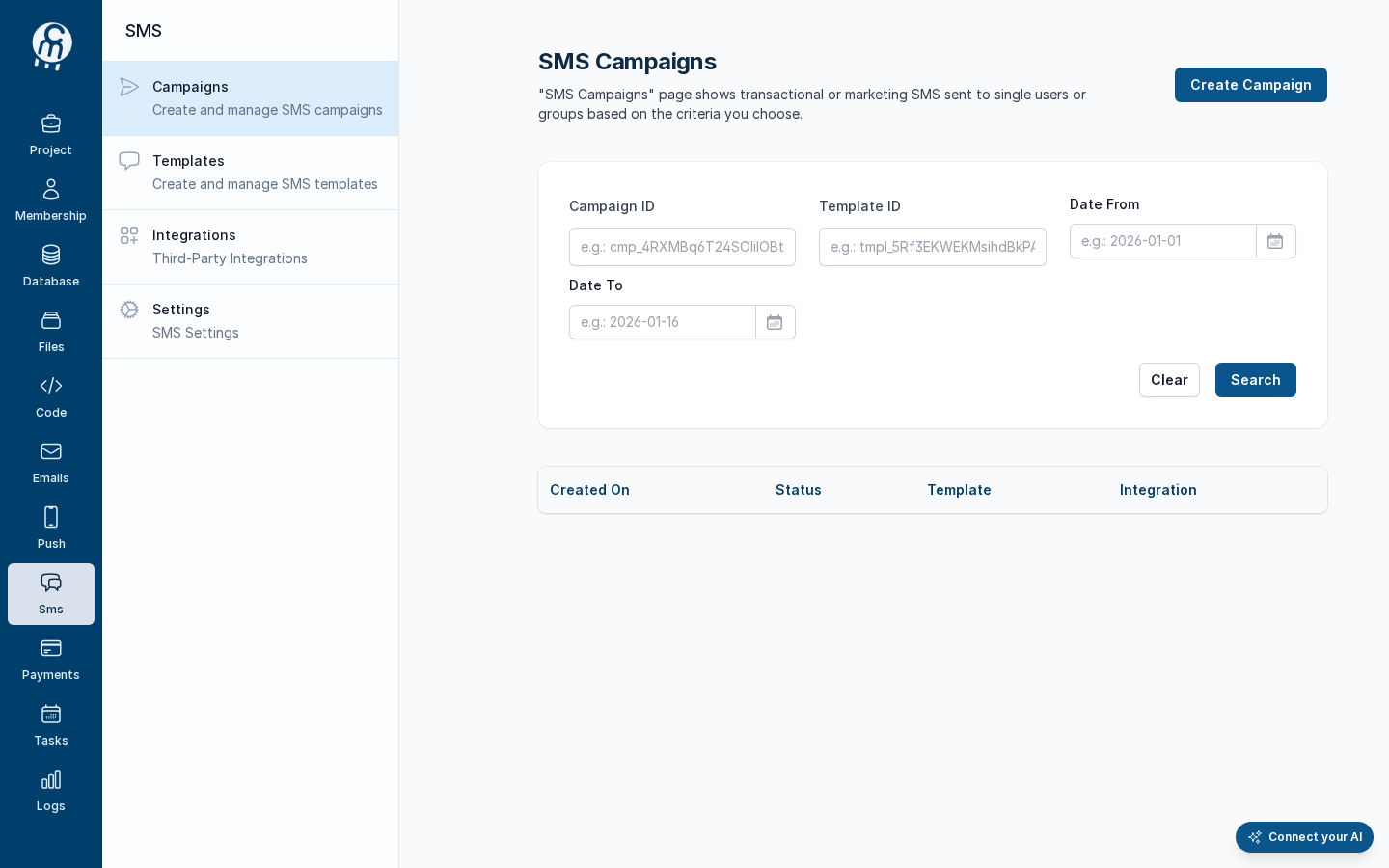
After **ENABLE**, Cloud opens **SMS → Campaigns** and shows the SMS menu: Campaigns, Templates, Integrations, Settings. The first time the module is enabled, Norbix also adds the [Fake SMS (Test Me)](/codemash/cloud/sms/integrations/providers/fake-sms.md) integration and makes it the default, so you can try every flow at once — it completes every send and delivers nothing.
After ENABLE: the SMS Campaigns screen and the SMS menu.
To turn the module off again, see [Settings](/codemash/cloud/sms/settings.md) — templates and integrations are kept.
## Module map
| Screen | What it is for |
| --------------------------------------------------- | ------------------------------------------------------------------------------------------------------------------------------------------------------------------------------------------------------------------------------------------------------------------------------------------------------------------------------------------------ |
| [Campaigns](/codemash/cloud/sms/campaigns.md) | Every send of the project — [now](/codemash/cloud/sms/campaigns/new.md) or [later](/codemash/cloud/sms/campaigns/schedule.md) — with its [details](/codemash/cloud/sms/campaigns/details.md), [message log](/codemash/cloud/sms/campaigns/log.md) and a [stop](/codemash/cloud/sms/campaigns/stop.md) button. |
| [Templates](/codemash/cloud/sms/templates.md) | The message text, one version per language, with tokens: [create and edit](/codemash/cloud/sms/templates/editor.md), [translate](/codemash/cloud/sms/templates/translate.md), [send a test](/codemash/cloud/sms/templates/test-send.md), [archive](/codemash/cloud/sms/templates/publish.md), [delete](/codemash/cloud/sms/templates/delete.md). |
| [Integrations](/codemash/cloud/sms/integrations.md) | The providers that deliver your SMS — [Twilio](/codemash/cloud/sms/integrations/providers/twilio.md) and the [Fake sandbox](/codemash/cloud/sms/integrations/providers/fake-sms.md) send today — and which one is the default. |
| [Settings](/codemash/cloud/sms/settings.md) | Turn the module off for the project, after seeing what depends on it. |
## Your first SMS
1. [Check the integration](/codemash/cloud/sms/integrations.md) — after **ENABLE** the Fake **Test Me** is the default; [connect Twilio](/codemash/cloud/sms/integrations/providers/twilio.md) when you want real messages.
2. [Create a template](/codemash/cloud/sms/templates/editor.md) — for example `Login code`: `Hi @Model.FirstName, your Acme code is @Model.Code.` Add a [translation](/codemash/cloud/sms/templates/translate.md) for every project language.
3. [Send a test](/codemash/cloud/sms/templates/test-send.md) to one phone number from the template's **Test** panel.
4. [Create a campaign](/codemash/cloud/sms/campaigns/new.md) — pick the audience, the template and the provider, press **Send** — then read its [details](/codemash/cloud/sms/campaigns/details.md) and [message log](/codemash/cloud/sms/campaigns/log.md).
SMS can also be sent by a trigger: in a Membership, Files, Payments or Database collection trigger, choose the action **Send SMS** and fill the same template, language, "on behalf of" and provider fields as on a campaign. Each time the trigger fires it creates a one-off campaign that is listed under Campaigns. See [Triggers](/codemash/cloud/concepts/triggers.md).
## Use it from code
Every **Do it from code** block in the SMS pages uses this client. Install `@norbix.ai/ts` (see [SDK install](/codemash/sdks/install.md)) and set `NORBIX_API_KEY` to a project API key.
```ts
import { Norbix } from '@norbix.ai/ts';
const projectId = 'pr_5UiDYBebLeBJZuvstSC95p';
const norbix = new Norbix({ projectId }); // the key comes from NORBIX_API_KEY
const { list } = await norbix.hub.notifications.getSmsTemplates();
console.log(list.items.map((t) => `${t.templateName} (${t.type})`));
```
The CLI lines use the generic `norbix hub …` commands of `@norbix.ai/cli` (signed in with `norbix login`, project id in `NORBIX_PROJECT_ID`):
```sh
norbix hub notifications sms templates get
```
{% hint style="info" %}
The client sends the project id with every call (the `norbix-project-id` header), so the requests do not repeat it. The CLI does the same with the project of `norbix login --project …`, `norbix config set projectId …` or `NORBIX_PROJECT_ID`. The shorter `norbix sms …` commands work too, for example `norbix sms templates`.
{% endhint %}
## Related
[Campaigns concept](/codemash/cloud/concepts/campaigns.md) · [Message templates concept](/codemash/cloud/concepts/message-templates.md) · [Tokens binding](/codemash/cloud/concepts/tokens-binding.md) · [Triggers](/codemash/cloud/concepts/triggers.md) · [SDK](/codemash/sdks/notifications/sms.md) · [CLI](/codemash/cli/reference/sms.md) · [API](/codemash/api-reference/notifications/sms.md)