> For the complete documentation index, see [llms.txt](https://codemash.gitbook.io/codemash/llms.txt). Markdown versions of documentation pages are available by appending `.md` to page URLs; this page is available as [Markdown](https://codemash.gitbook.io/codemash/cloud/project/create.md).

# Create a project

Create a project with the three-step New Project wizard — details and location, database, review.

**Where:** Projects → **Create a new PROJECT** · `/`

## Before you start

* You are signed in ([Sign up and sign in](/codemash/cloud/account/sign-in.md)).
* On the managed service your subscription must allow one more project. A new account has none yet: the last wizard step then shows **Start Trial...** instead of **Save** and sends you to the payment checkout to start the trial ([Managed service](/codemash/get-started/managed-service.md)). When the cap is reached, the wizard shows **Project Limit Reached** with **Go to Portal**.
* For **Mongo DB (Connection String)**: a MongoDB connection string that the Norbix servers can reach.

## Steps

1. On **Projects**, press **Create a new PROJECT**. The **New Project** window opens on step **01 Project Details**.

   <figure><img src="https://712692422-files.gitbook.io/~/files/v0/b/gitbook-x-prod.appspot.com/o/spaces%2FHy372bqsaex2cqS3ikhL%2Fuploads%2Fgit-blob-453765b2769c0f2235c4fd0759e7a8fe682bdc05%2Fcreate-1.png?alt=media" alt="Projects screen with the Create a new PROJECT [2/25] card"><figcaption><p>2 of 25 projects used.</p></figcaption></figure>
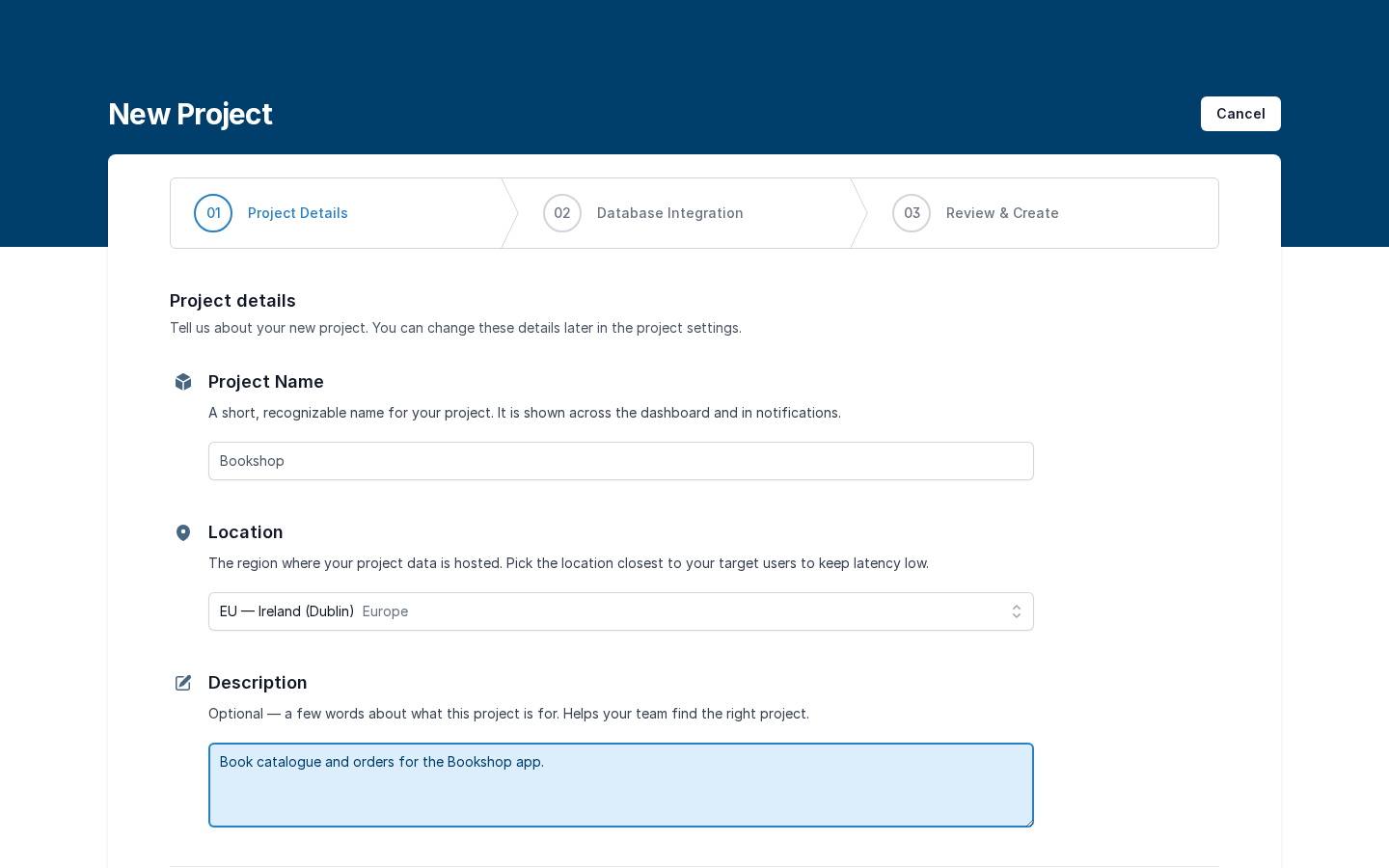
2. Fill in **Project details**. Open **Location** and pick the region where the project's data is kept — pick it before you press **Next** (see the warning below).

   | Field        | Required                             | What it does                                                                                                                                                                                                                           | Example                                           |
   | ------------ | ------------------------------------ | -------------------------------------------------------------------------------------------------------------------------------------------------------------------------------------------------------------------------------------- | ------------------------------------------------- |
   | Project Name | yes                                  | The name shown everywhere. It also makes the project's short name in addresses (`Bookshop` → `bookshop`).                                                                                                                              | `Bookshop`                                        |
   | Location     | yes (managed service and Enterprise) | The primary region: **EU — Germany (Frankfurt)**, **EU — Ireland (Dublin)**, **US — East (Virginia)**, **US — West (Oregon)** or **Asia-Pacific — Singapore**. It cannot be changed later. A self-hosted installation has no Location. | **EU — Ireland (Dublin)**                         |
   | Description  | no                                   | A few words about the project.                                                                                                                                                                                                         | `Book catalogue and orders for the Bookshop app.` |

   <figure><img src="https://712692422-files.gitbook.io/~/files/v0/b/gitbook-x-prod.appspot.com/o/spaces%2FHy372bqsaex2cqS3ikhL%2Fuploads%2Fgit-blob-b82099b80f8355d39e809acfa4f52bfd13a1931a%2Fcreate-2.png?alt=media" alt="Location list open with the five regions"><figcaption><p>The Location list.</p></figcaption></figure>

   <figure><img src="https://712692422-files.gitbook.io/~/files/v0/b/gitbook-x-prod.appspot.com/o/spaces%2FHy372bqsaex2cqS3ikhL%2Fuploads%2Fgit-blob-d073d8b58094e8ef01b727e715bcc5ed1bfd5c9f%2Fcreate-3.png?alt=media" alt="Project details filled: Bookshop, EU — Ireland (Dublin), description"><figcaption><p>Step 1 filled in.</p></figcaption></figure>

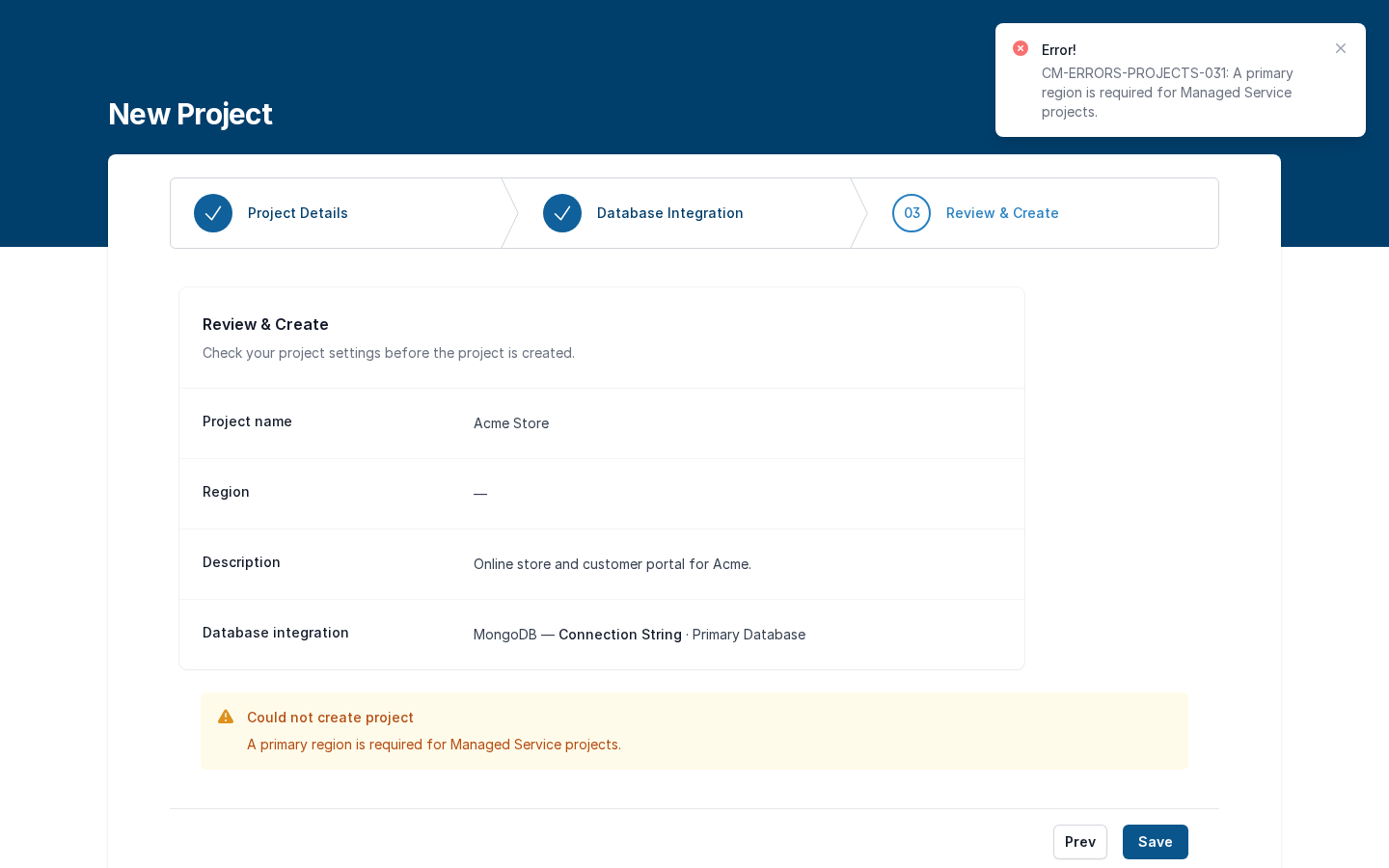
   <div data-gb-custom-block data-tag="hint" data-style="warning" class="hint hint-warning"><p><strong>Next</strong> lets you leave step 1 with <strong>Location</strong> empty. The wizard then fails only at the end: <strong>Save</strong> shows <strong>Could not create project — A primary region is required for Managed Service projects.</strong> Go back with <strong>Prev</strong>, pick the <strong>Location</strong>, and save again.</p></div>
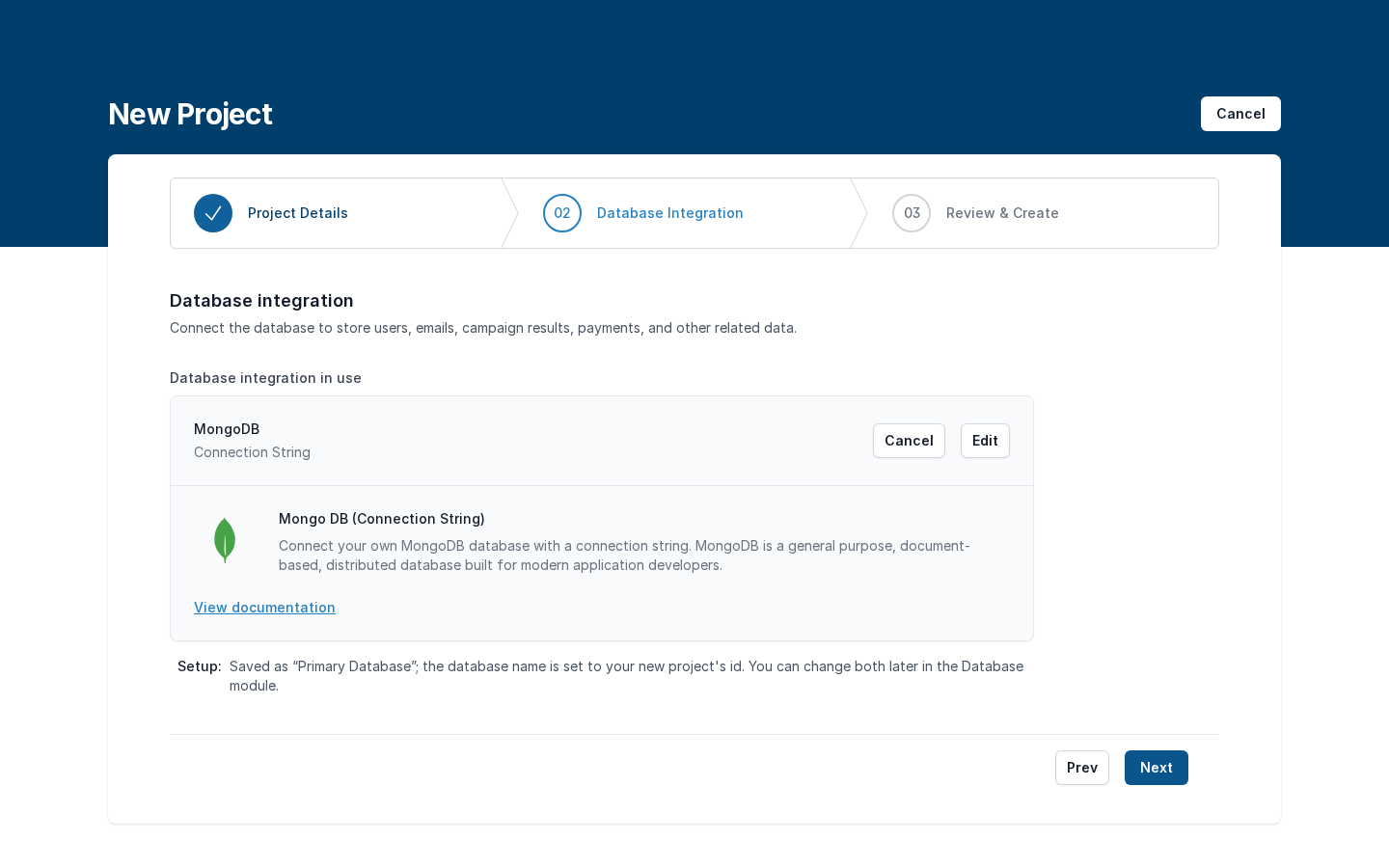
3. Press **Next**. On **02 Database Integration** pick where the project's data lives and press **Connect** on that card:

   * **Mongo DB (Connection String)** — your own MongoDB. Paste the **Connection string** (for example `mongodb+srv://user:password@cluster.mongodb.net`) and press **Save**. Norbix tests the connection when the project is created; the integration is named **Primary Database** and the database gets the project id as its name. You can rename both later in Database.
   * **Mongo DB (Atlas Flex)** — managed service only: Norbix creates a MongoDB Flex cluster for you and bills it by usage (pick the **Cluster tier**). The project shows **PROVISIONING** until the cluster is ready.

   <figure><img src="https://712692422-files.gitbook.io/~/files/v0/b/gitbook-x-prod.appspot.com/o/spaces%2FHy372bqsaex2cqS3ikhL%2Fuploads%2Fgit-blob-76c1121075d3a5d4ce13f5626cd7b5cc7646a501%2Fcreate-4.png?alt=media" alt="Database integration step with the Connection String and Atlas Flex cards"><figcaption><p>The two database choices.</p></figcaption></figure>

   <figure><img src="https://712692422-files.gitbook.io/~/files/v0/b/gitbook-x-prod.appspot.com/o/spaces%2FHy372bqsaex2cqS3ikhL%2Fuploads%2Fgit-blob-c21ceef9344b141a2802d824c35a963107490a77%2Fcreate-5.png?alt=media" alt="Mongo DB (Connection String) dialog with a connection string and Save"><figcaption><p>Your own MongoDB.</p></figcaption></figure>

   <figure><img src="https://712692422-files.gitbook.io/~/files/v0/b/gitbook-x-prod.appspot.com/o/spaces%2FHy372bqsaex2cqS3ikhL%2Fuploads%2Fgit-blob-ac9b6c71f3972f39e43da3432199cef72874d1ea%2Fcreate-6.png?alt=media" alt="Database integration in use: MongoDB Connection String, Primary Database"><figcaption><p>The database is set.</p></figcaption></figure>
4. Press **Next**. **03 Review & Create** shows **Project name**, **Region**, **Description** and **Database integration**. Check them and press **Save** (or **Start Trial...** when you have no subscription yet).

   <figure><img src="https://712692422-files.gitbook.io/~/files/v0/b/gitbook-x-prod.appspot.com/o/spaces%2FHy372bqsaex2cqS3ikhL%2Fuploads%2Fgit-blob-2e30cf7c80c7e50e6b6e0bee1b99469fd012d0d5%2Fcreate-7.png?alt=media" alt="Review and Create: Bookshop, EU — Ireland (Dublin), description, MongoDB Connection String"><figcaption><p>Step 3 — Review &#x26; Create.</p></figcaption></figure>

   This is the error you get when **Location** was skipped:

   <figure><img src="https://712692422-files.gitbook.io/~/files/v0/b/gitbook-x-prod.appspot.com/o/spaces%2FHy372bqsaex2cqS3ikhL%2Fuploads%2Fgit-blob-db6ee0f0e6c54a123932449310396f316da2d1e3%2Fcreate-x3.png?alt=media" alt="Review step with Region empty and the warning Could not create project — A primary region is required for Managed Service projects"><figcaption><p>Region empty — Save fails.</p></figcaption></figure>

## Result

The wizard closes and the new card appears on **Projects** with its region badge; the counter goes up by one (`[3/25]`). Open the card: a project created with a database starts with **Database** and **Users** (Membership) switched on; every other module is under **Available modules** ([Project](/codemash/cloud/project.md)). If the database test fails, the wizard stays open with **Could not create project** and the reason — fix step 2 and press **Save** again.

<figure><img src="https://712692422-files.gitbook.io/~/files/v0/b/gitbook-x-prod.appspot.com/o/spaces%2FHy372bqsaex2cqS3ikhL%2Fuploads%2Fgit-blob-e19dea3a936b9c1c51a30dc57c11d1d90fbac924%2Fcreate-8.png?alt=media" alt="Projects screen with test, Acme Store and Bookshop"><figcaption><p>Bookshop is created.</p></figcaption></figure>

## Change or remove it later

* **Name, description, logo** — [Brand](/codemash/cloud/project/settings/brand.md).
* **More regions** — [Access → Region Settings](/codemash/cloud/project/settings/access.md).
* **Disable or delete the project** — [Termination](/codemash/cloud/project/settings/termination.md).
* The **Location** (primary region) cannot be changed.

## Do it from code

```ts
const { id } = await norbix.hub.account.createProject({
  projectName: 'Recipes',
  description: 'Recipe catalogue for the Acme kitchen app.',
  primaryRegion: 'nb-eu-germany',
  integration: { provider: 'MongoDbConnectionString', isEnabled: true, connectionString: 'mongodb://mongo:27017' },
});
const ready = await norbix.hub.account.waitForProjectActive({ projectId: id });
console.log(id, ready.status); // pr_6pajb91ho223gtyMqAy8Rh Active
```

```sh
norbix hub account project create --projectName Recipes --primaryRegion nb-eu-germany --integration '{"provider":"MongoDbConnectionString","isEnabled":true,"connectionString":"mongodb://mongo:27017"}'
```

The region codes come from [Get Account Regions](/codemash/api-reference/account/regions/get-account-regions.md). The client setup is on the [Account page](/codemash/cloud/account.md#use-it-from-code). API: [Create Project](/codemash/api-reference/account/projects/create-project.md) · [Wait For Project Active](/codemash/api-reference/account/projects/wait-for-project-active.md)