> For the complete documentation index, see [llms.txt](https://codemash.gitbook.io/codemash/llms.txt). Markdown versions of documentation pages are available by appending `.md` to page URLs; this page is available as [Markdown](https://codemash.gitbook.io/codemash/cloud/database/schema/nesting.md).

# Nested forms and arrays

Objects inside records and lists of them — nested forms and arrays up to five levels deep, dotted-path updates, arrayFilters, filters and sort at depth, and how the list shows them.

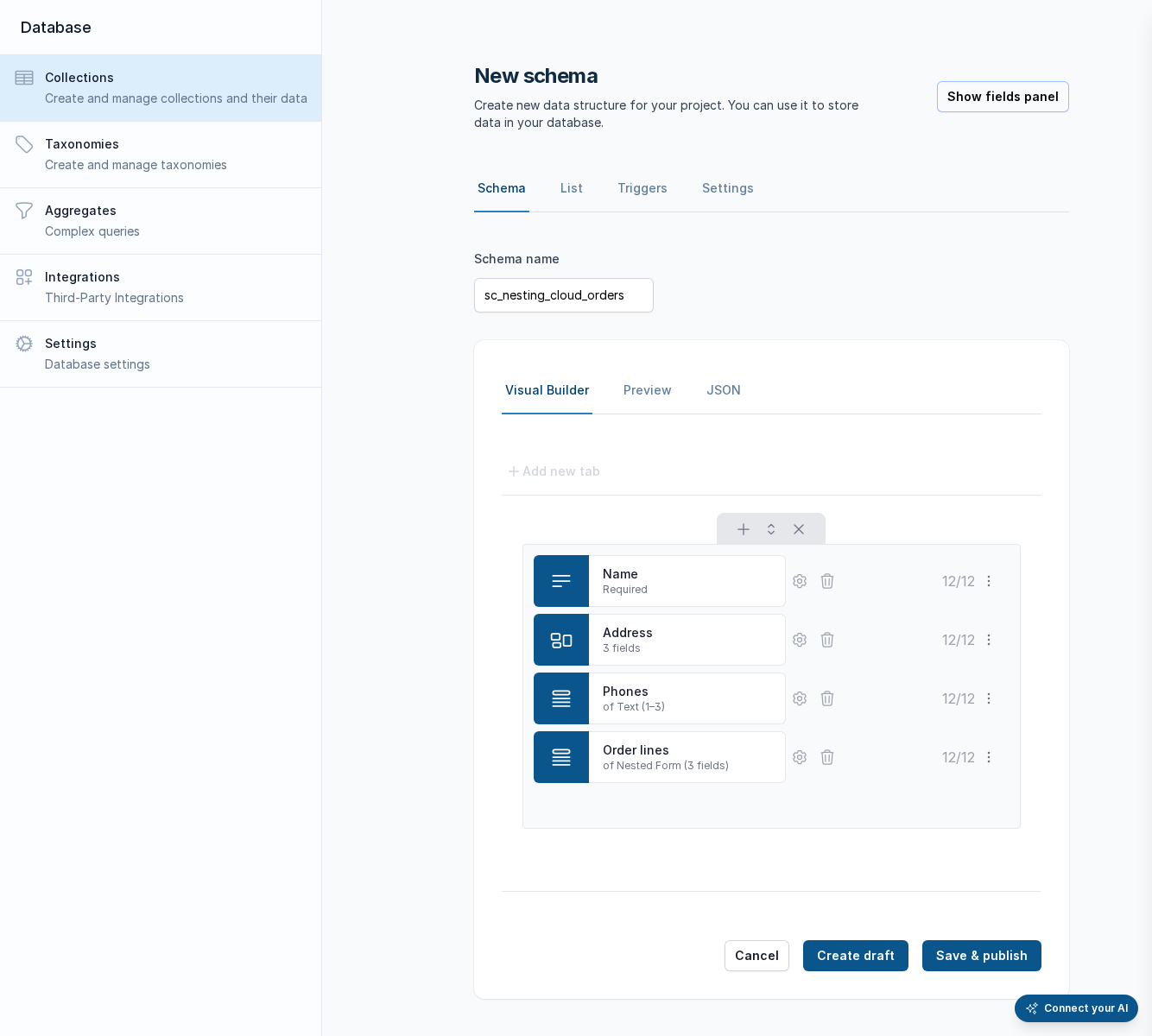
A record is not flat. An order has an address (an object), a list of phone numbers (an array of strings) and order lines (an array of objects, each with its own price and shipping address). Norbix models this with two field types — [Nested form](/codemash/cloud/database/schema/field-types/nested-form.md) (`object`) and [Array](/codemash/cloud/database/schema/field-types/array.md) — that nest into each other **up to five levels**, with the same rules, the same widgets and the same error paths at every level.

## How Norbix models it

```
orders
├─ name            string
├─ address         object   (nested form)        level 1
│  ├─ street       string                        level 2
│  └─ geo          geolocation                   level 2
├─ phones          array of string               level 1
└─ lines           array of object               level 1
   ├─ sku, qty     string, integer               level 2
   ├─ price        currency                      level 2
   └─ shipping     object                        level 2
      └─ address   object                        level 3
         └─ geo    geolocation                   level 4
```

* Root fields are level 1; each nested form or array adds one. The sixth level is refused when the schema is saved: `CM-ERRORS-SCHEMA-036` `Schema field 'a.b.c.d.e.f' is nested 6 levels deep; the limit is 5.` The builder's field editor stops at the same depth.
* An array's `items` is **any** field type: a primitive, a reference, a nested form, or another array (`matrix`: an array of arrays of integers).
* A nested form's members are **closed** — an undeclared member is refused (`CM-ERRORS-DATABASE-047`) — while the root of the record stays open.
* References inside nested data are checked on write and expanded on read like top-level ones — see [References](/codemash/cloud/database/schema/references.md).

<figure><img src="https://712692422-files.gitbook.io/~/files/v0/b/gitbook-x-prod.appspot.com/o/spaces%2FHy372bqsaex2cqS3ikhL%2Fuploads%2Fgit-blob-9305d9e418ef34322f8a7cfe8fc9ad4658a4e160%2Fnesting-builder-2.png?alt=media" alt="New schema sc_nesting_cloud_orders in the Visual Builder: the fields Name (Required), Address (3 fields), Phones (of Text (1–3)) and Order lines (of Nested Form (3 fields)), each 12/12; Cancel, Create draft and Save &#x26; publish"><figcaption><p>The builder names a nested form by its field count and an array by its item type and bounds.</p></figcaption></figure>

## Validation at depth

Every rule applies where the value sits, and the error names the **path**: a dotted member for nested forms, a bracketed position for arrays.

| Record                                                                                                                          | Answer                                                                                                                               |
| ------------------------------------------------------------------------------------------------------------------------------- | ------------------------------------------------------------------------------------------------------------------------------------ |
| `{ "address": { "city": "Vilnius" } }` with `street` required                                                                   | `CM-ERRORS-DATABASE-030` `Field 'address.street' is invalid: a value is required`                                                    |
| `{ "address": { "street": "Main", "zip": "01100" } }`                                                                           | `CM-ERRORS-DATABASE-047` `Field 'address' is invalid: unknown member 'zip' (allowed: street, city, geo)`                             |
| `{ "lines": [] }` with `minItems: 1`                                                                                            | `CM-ERRORS-DATABASE-040` `Field 'lines' is invalid: must have at least 1 items`                                                      |
| `{ "lines": [{ "sku": "A", "qty": 0 }] }`                                                                                       | `CM-ERRORS-DATABASE-040` `Field 'lines[0].sku' …` and `CM-ERRORS-DATABASE-043` `Field 'lines[0].qty' is invalid: must be at least 1` |
| `{ "lines": [{ "sku": "A-1", "qty": 1, "shipping": { "address": { "geo": { "type": "Point", "coordinates": [200, 1] } } } }] }` | `CM-ERRORS-DATABASE-048` `Field 'lines[0].shipping.address.geo' is invalid: longitude 200 must be between -180 and 180`              |
| `{ "matrix": [[1, 2], [3, "x"]] }`                                                                                              | `CM-ERRORS-DATABASE-039` `Field 'matrix[1][1]' is invalid: must be an integer`                                                       |
| `{ "prices": [1.5, 1.5] }` with `uniqueItems: true`                                                                             | `CM-ERRORS-DATABASE-046` `Field 'prices' is invalid: entries must be unique — repeated at positions 0, 1`                            |

Cloud shows each error under the exact row and field; the tabs that hold a refused value are marked.

<figure><img src="https://712692422-files.gitbook.io/~/files/v0/b/gitbook-x-prod.appspot.com/o/spaces%2FHy372bqsaex2cqS3ikhL%2Fuploads%2Fgit-blob-2bf1a5af0e01a8fab24cc66a1086f1b2660d471a%2Fnesting-form-1.png?alt=media" alt="Edit Record form of sc_nesting_cloud_orders: Name sc order 1; a framed Address nested form with Street Main St 1, City Vilnius and Geo with Latitude 54.68 and Longitude 25.27; a Phones array with 2 of 1–3 rows, Add row, and the rows +370 600 00001 and +370 600 00002 with move and remove buttons; Order lines below"><figcaption><p>The record form: a nested form as a framed box, an array as numbered rows with add, move and remove.</p></figcaption></figure>

## Updating one piece: dotted paths

`updateOne` / `updateMany` take the fields to change as a plain document, applied with `$set`. A **dotted path** reaches into nested data, and the server resolves it against the schema before it writes:

| Update document                                                        | Effect                                                                                 |
| ---------------------------------------------------------------------- | -------------------------------------------------------------------------------------- |
| `{ "address.city": "Kaunas" }`                                         | one member of a nested form                                                            |
| `{ "lines.0.qty": 3 }`                                                 | one entry of an array, by position                                                     |
| `{ "lines.$[].qty": 1 }`                                               | every entry                                                                            |
| `{ "lines.$[line].qty": 3 }` + `arrayFilters: [{ "line.sku": "A-1" }]` | the entries an **arrayFilters** entry matches — one filter document per `$[name]` used |
| `{ "lines.0.shipping.address.city": "Riga" }`                          | any depth, mixing members and positions                                                |

```ts
await norbix.api.database.updateOne({
  collectionName: 'orders',
  id,
  update: JSON.stringify({ 'lines.$[line].qty': 3 }),
  arrayFilters: JSON.stringify([{ 'line.sku': 'A-1' }]),
});
```

```sh
norbix api database one update --collectionName orders --id 6650a1b2c3d4e5f6a1b2c501 \
  --update '{"lines.$[line].qty":3}' --arrayFilters '[{"line.sku":"A-1"}]'
```

What the resolver refuses, before anything is written:

| Path                                              | Answer                                                                                                                                                           |
| ------------------------------------------------- | ---------------------------------------------------------------------------------------------------------------------------------------------------------------- |
| `address.zip` (undeclared member)                 | `CM-ERRORS-DATABASE-047` `Field 'address' is invalid: unknown member 'zip' (allowed: street, city, geo)`                                                         |
| `name.first` (through a string)                   | `CM-ERRORS-DATABASE-039` `Field 'name' is invalid: is a string and has no member 'first'`                                                                        |
| `lines.qty` (an array hop that is not a position) | `CM-ERRORS-DATABASE-039` `Field 'lines' is invalid: 'qty' is not an array position — use an index (lines.0), $[] for every element or $[name] with arrayFilters` |
| `notes.batch` into a JSON field with `maxBytes`   | `CM-ERRORS-DATABASE-040` `Field 'notes' is invalid: is a JSON object capped at 4096 bytes — set the whole object, not its member 'batch'`                        |
| `$inc`, `$push` or any `$` operator in the update | `CM-ERRORS-DATABASE-035` — send the fields as a plain document                                                                                                   |
| `arrayFilters` with only `$or` / `$and` keys      | refused — each filter names its `$[name]` identifier                                                                                                             |

The value the path reaches is validated with that field's rules (`lines.0.qty: 0` is `must be at least 1`). A path whose first segment is not a declared field is written as is — the root is open.

## Filtering and sorting at depth

* **Filter** with dotted paths, the MongoDB way: `{ "address.city": "Vilnius" }`, `{ "lines.sku": "A-1" }` (any entry matches), `{ "lines.0.qty": { "$gt": 1 } }`, `{ "lines": { "$elemMatch": { "sku": "A-1", "qty": { "$gte": 2 } } } }`. See [Filter](/codemash/cloud/concepts/search-parameters/filter.md).
* **Sort** on a nested-form member with a dotted path: `sortBy: "address.city"`. A sort **on or through a list** (`lines`, `lines.qty`, `tags`, `photos`) is refused — a list cannot be paged on reliably: `CM-ERRORS-DATABASE-039` `Field 'lines' is invalid: is an array — a list cannot be sorted or paged on; sort on another field`. Sort on a top-level or nested-form field instead.
* **Projection** works at depth too: `{ "lines.sku": 1 }`.
* **Indexes:** a dotted path can be indexed like any field — see [Records list columns and index warnings](/codemash/cloud/database/collections/schema-indexes.md).

## The records list

The list shows a nested value as a short **summary** instead of raw JSON — the members of a nested form, the entries of an array, references inside them by their display value. The [List tab](/codemash/cloud/database/collections/schema-indexes.md) picks which columns are shown and the default sort; a list field cannot be the default sort (the server refuses a sort on a list).

## Do it from code

```ts
const dataSchema = {
  $schema: 'https://norbix.ai/schemas/meta/v1.json', title: 'orders', type: 'object', additionalProperties: true,
  properties: {
    address: { type: 'object', properties: { street: { type: 'string', minLength: 1 }, city: { type: 'string' } }, required: ['street'] },
    phones: { type: 'array', items: { type: 'string' }, minItems: 1, maxItems: 3 },
    lines: { type: 'array', minItems: 1, items: { type: 'object',
      properties: { sku: { type: 'string', minLength: 2 }, qty: { type: 'integer', minimum: 1 } }, required: ['sku', 'qty'] } },
  },
  required: ['lines'],
};
await norbix.api.database.insertOne({
  collectionName: 'orders',
  document: JSON.stringify({
    address: { street: 'Main St 1', city: 'Vilnius' },
    phones: ['+370 600 00001'],
    lines: [{ sku: 'A-1', qty: 2 }],
  }),
});
```

```sh
norbix api database find --collectionName orders --filter '{"lines.sku":"A-1"}' --sortBy address.city
```

The client setup is on the [Database page](/codemash/cloud/database.md#use-it-from-code). API: [Update One](/codemash/api-reference/database/collections/update-one.md) · [Update Many](/codemash/api-reference/database/collections/update-many.md) · [Find](/codemash/api-reference/database/collections/find.md)

## Related

[Nested form](/codemash/cloud/database/schema/field-types/nested-form.md) · [Array](/codemash/cloud/database/schema/field-types/array.md) · [References](/codemash/cloud/database/schema/references.md) · [Field type reference](/codemash/cloud/database/schema/field-types.md) · [Schema authoring guide](/codemash/cloud/database/schema.md) · [Filter](/codemash/cloud/concepts/search-parameters/filter.md) · [Sort](/codemash/cloud/concepts/search-parameters/sort.md)
